Subscriptions are designed to be easy to start and easy to forget. A free trial becomes a monthly charge, an annual plan renews at a higher price, and a service you stopped using keeps billing quietly. Here is a practical way to see everything you pay for and to cancel on time.
Step 1: Find every subscription you have
Subscriptions hide in three places. Check all of them once.
- Your bank and card statements. Go back three months, since some charges are quarterly, and note every recurring payment. For yearly plans, search the last twelve months.
- Your phone’s app store. On iPhone: Settings → your name → Subscriptions. On Android: Play Store → profile → Payments & subscriptions → Subscriptions.
- Your email. Search for “receipt”, “renewal”, “subscription” and “trial”.
Put them in one list:
| Service | Price | Billing | Next renewal | Keep? |
|---|---|---|---|---|
| Streaming | $12.99 | Monthly | 29th | Yes |
| Cloud storage | $2.99 | Monthly | 3rd | Yes |
| Language app | $59.99 | Yearly | 14 March | Review |
| Fitness app | Free trial | Then $9.99/month | 28 October | Decide |
Step 2: Decide what stays
For each subscription, ask: did I use this in the last month? Would I sign up for it today at this price? If not, cancel it. Many people find at least one subscription they had forgotten about.
For the ones you keep, consider whether a yearly plan is cheaper than monthly, but only for services you are sure you will use all year.
Step 3: Understand how renewals work
Most subscriptions renew automatically. The rules for cancelling differ by where you pay:
- Through Apple: subscriptions renew automatically unless you cancel at least 24 hours before the end of the current period.
- Through Google Play: you can cancel at any time; you usually keep access until the end of the period you have paid for.
- Directly with the service: check the terms in your confirmation email. Some require notice before the renewal date.
Free trials usually turn into paid plans automatically at the end of the trial. Cancelling during the trial usually means you are not charged, and often you can keep using it until the trial ends.
Step 4: Put every renewal date in front of you
The key date is not the renewal date itself; it is the last day you can cancel. Put a reminder a couple of days before each renewal and before every free trial ends.
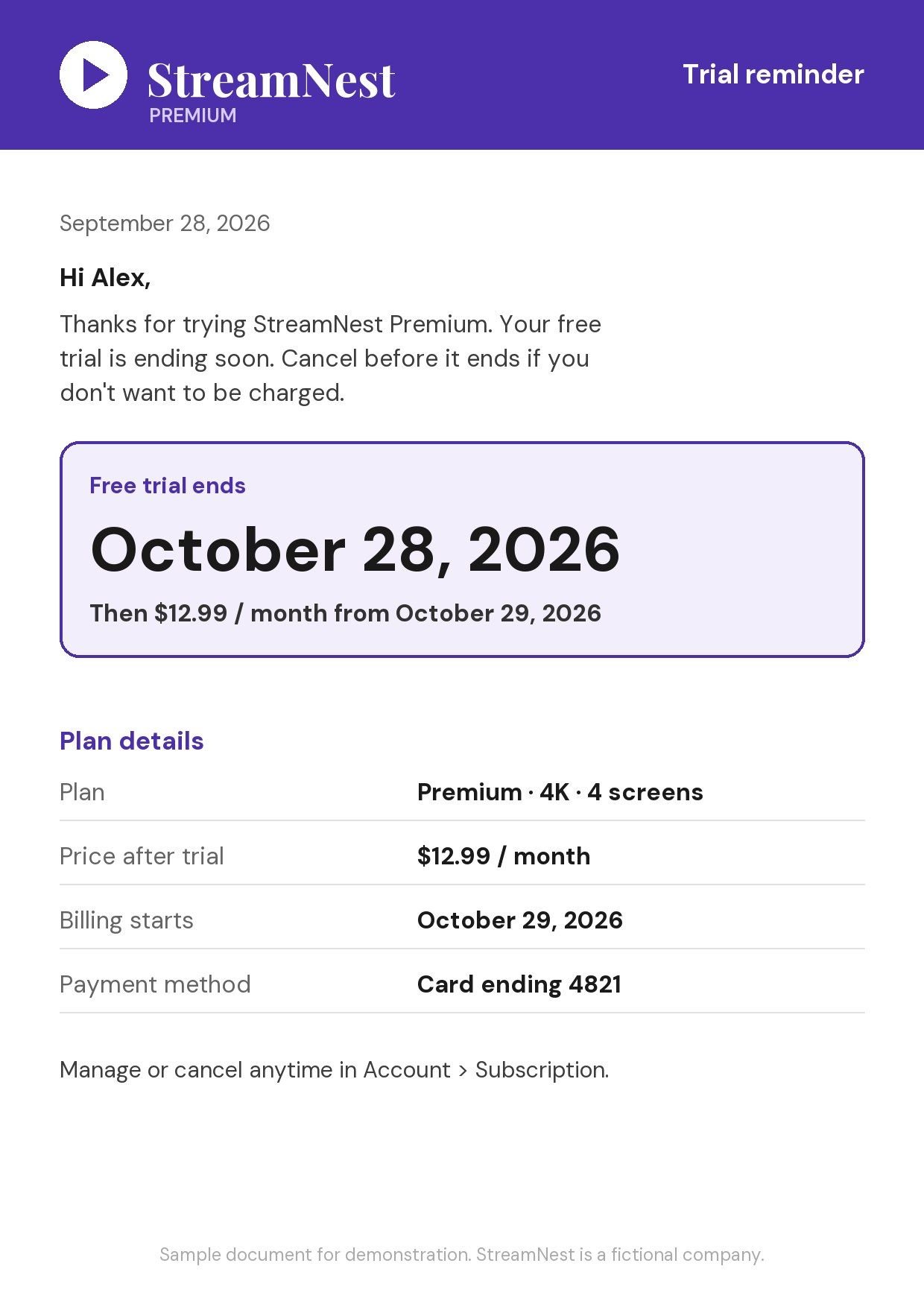
The easiest moment to do this is when you sign up. Take a screenshot of the confirmation screen or email showing the trial end date. Invited reads the screenshot, finds the date and the price, and reminds you before you are charged. You can set it to remind you up to 2 days before.
Step 5: Cancel properly
When you cancel:
- Cancel where you pay. A subscription billed through Apple or Google must be cancelled there; deleting the app does not cancel it.
- Look for a confirmation. Keep the cancellation email or screenshot until the date passes without a charge.
- Check your next statement. Make sure no further charges appear.
Step 6: Review twice a year
Set a reminder every six months to repeat Steps 1 and 2. Prices change, and new subscriptions creep in.
Free trial habits that save money
- Set the reminder the moment you start the trial, not later.
- Use the trial fully, then decide deliberately.
- Be careful with “introductory” prices. A low first year often renews at the full price.
Subscriptions for the whole household
Families often pay for the same thing twice without realising it: two streaming plans, two cloud storage plans, two music subscriptions. Many services offer family or household plans that cost less than two individual ones. When you review your list, look across everyone’s subscriptions, not just your own.
It also helps to decide who pays for what. Shared subscriptions on one person’s card, with a clear list everyone can see, avoid duplicate sign-ups and surprise charges.
Annual renewals deserve a longer warning
Monthly subscriptions cost a little and remind you every month. Annual ones cost more and remind you once, often a year after you last thought about them. For any annual plan:
- Set the reminder a week or two before the renewal, not a day.
- Check the renewal price. Introductory discounts usually end at the first renewal.
- Ask whether you still need it. A year is a long time; your habits may have changed.
When you have already been charged
If a renewal slipped through, act quickly. Many app stores and services have a refund request process, and a prompt, polite request is more likely to succeed than a late one. Then cancel so it does not happen again, and set a reminder for next time.
Summary
- Find every subscription: statements, app stores, email.
- Cancel what you do not use.
- Know the cancellation rules for where you pay.
- Set a reminder before every renewal and trial end.
- Cancel where you pay, and keep the confirmation.
- Review every six months.